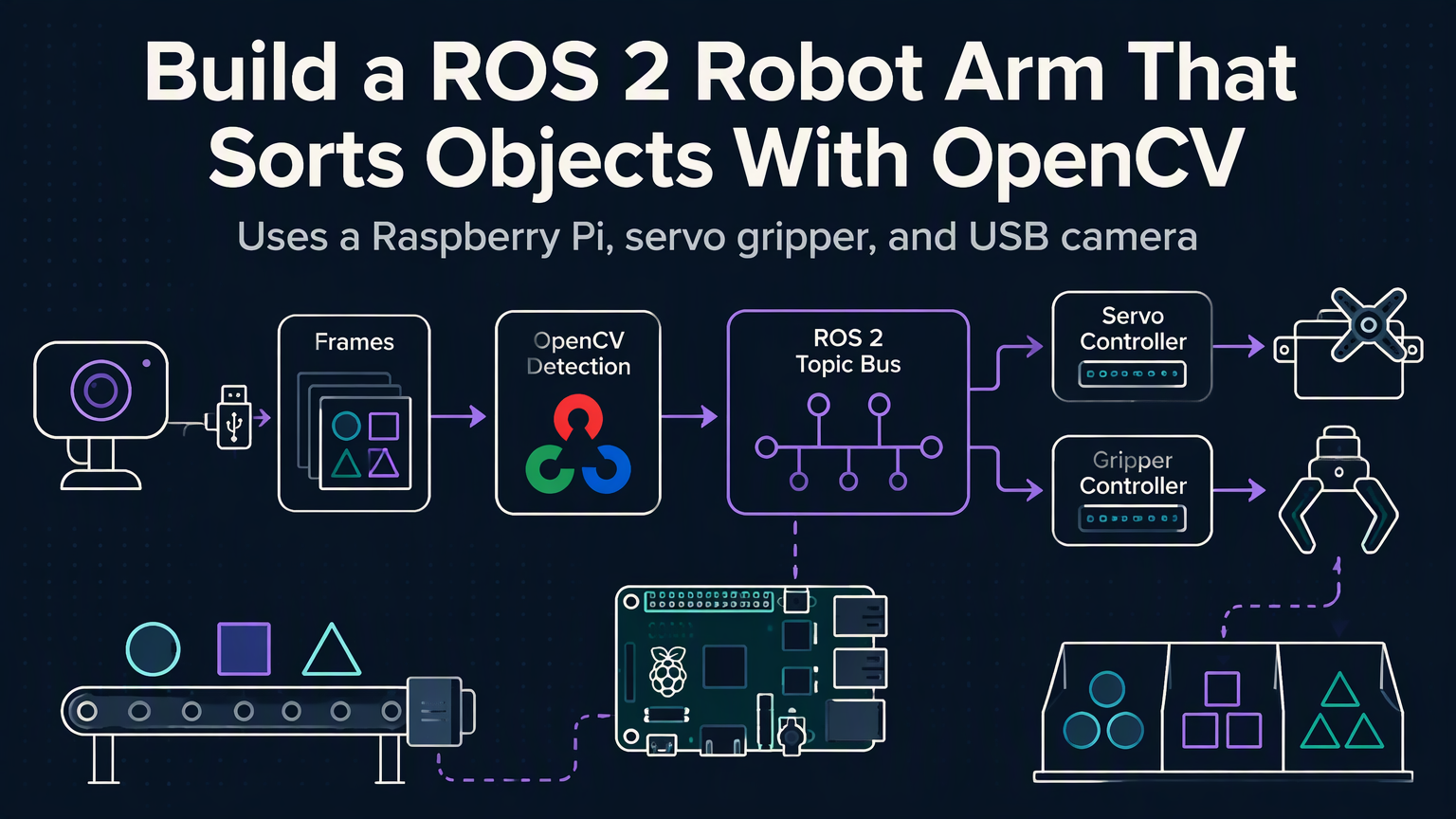
Most robotics tutorials stop at "Hello World" — a servo twitching on a breadboard. This guide goes further: a ROS 2–driven arm that sees, decides, and sorts objects by color in real time. No simulation. No hand-waving. Just a working cell you can build on a weekend budget.
Hardware That Won't Break the Bank
| Component | Spec | Approx. Cost |
|---|---|---|
| 6-DOF Arm | Aluminum, MG996R servos | $120 |
| Compute | Raspberry Pi 4 (4 GB) | $55 |
| Camera | Logitech C920 or Pi Cam v2 | $30 |
| MCU | Arduino Nano + PCA9685 | $15 |
| Power | 5 V 10 A switching supply | $18 |
| Misc | Jumper wires, M3 hardware, 3D-printed gripper | $25 |
Total: ~$263. Swap the Pi for a Jetson Nano if you want onboard GPU acceleration later.
Software Stack Overview
ROS 2 Humble on Ubuntu 22.04. Nodes: camera_driver (v4l2), color_detector (OpenCV HSV thresholding), trajectory_planner (MoveIt 2), arm_controller (serial to PCA9685). All Python except the firmware (C++).
💡
TipUse `ros2 run tf2_ros static_transform_publisher` for the camera-to-base link — avoids a full URDF at first.
Calibrate the Vision Pipeline
Tune HSV ranges under your actual lighting. Save them to a YAML config loaded by the detector node at launch.
MoveIt 2 Without the Headache
Generate a URDF from your CAD model (FreeCAD → urdf_exporter). Define a single planning group "arm" with the six joints. In moveit_config, set planning_plugin: ompl_interface/OMPLPlanner and request_adapters: default_planner_request_adapters/AddTimeOptimalParameterization. Use RRTConnectkConfigDefault for speed.
⚠️
WarningServo torque limits are real. Add joint velocity/acceleration limits in URDF or MoveIt will command impossible moves.
Close the Loop: Detect → Plan → Execute
The detector publishes geometry_msgs/msg/PointStamped (centroid in camera frame) + std_msgs/msg/String (color). A simple state machine node transforms the point to base_link, adds a pre-grasp offset, calls MoveIt's ComputeCartesianPath, then triggers the gripper servo. After drop-off in the color-coded bin, return to home.
"The difference between a demo and a robot is error handling — missed detections, planning failures, servo stalls. Plan for every "what if."
— Every roboticist who's cleaned up a crash
Next Steps to Harden the Cell
Add AprilTags on bins for pose refinement. Swap HSV for a tiny YOLOv8n model (ONNX Runtime, ~30 ms on Pi 4). Implement moveit_servo for jogging during setup. Log every pick/place to SQLite for cycle-time analytics. Mount a force sensor on the gripper for closed-loop grasp verification.
✦
ℹ️
NoteClone the full workspace: `git clone https://github.com/yourhandle/ros2-arm-sorter`. Run `colcon build --symlink-install`, source, then `ros2 launch arm_bringup sort_demo.launch.py`. First sort in under 20 minutes.