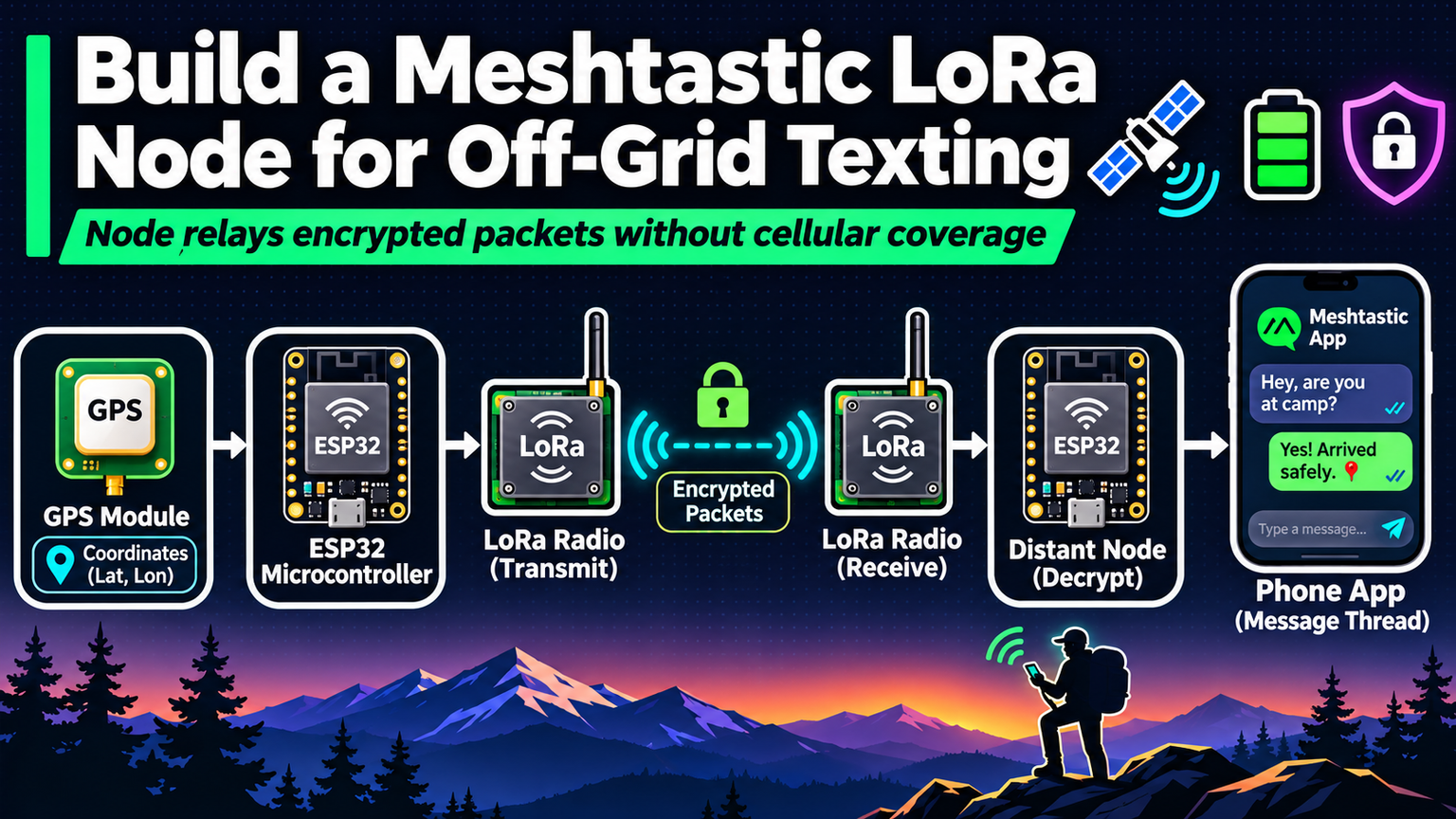
Your phone dies. The cell towers go dark. The group splits up on the trail. Now what? Most people wait. You build a Meshtastic node instead.
Why LoRa Mesh Changes the Game
Meshtastic runs on cheap ESP32 boards paired with LoRa (Long Range) radios. It creates a decentralized, encrypted mesh network for text and GPS location sharing. No SIM cards. No subscriptions. No infrastructure. Each node repeats packets for others, extending range far beyond a single radio’s reach. In urban canyons, expect 1–3 km. On ridgelines with line-of-sight, 20–50 km is routine.
Hardware You Need
| Component | Recommended Spec | Approx. Cost |
|---|---|---|
| MCU | ESP32 (30-pin DevKitC V4) | $6 |
| Radio | SX1262 / SX1276 915 MHz (US) or 868 MHz (EU) | $12 |
| Antenna | Tuned 915/868 MHz SMA or u.FL | $4 |
| Battery | 18650 3000 mAh + TP4056 charger board | $8 |
| Enclosure | Waterproof IP65 project box | $7 |
| Extras | JST connectors, heat shrink, M3 standoffs | $5 |
💡
TipBuy a pre-soldered T-Beam Supreme or Heltec Wireless Stick if you want to skip SMD work. Cost rises to ~$35 but reliability jumps.
Wiring the Radio to the ESP32
Connect the SX1262 module via SPI. The pinout below matches the standard Meshtastic firmware defaults for the ESP32 DevKitC. Double-check your specific board’s silkscreen before soldering.
Firmware Flashing in Three Steps
Meshtastic provides a web flasher that works in Chrome or Edge. No CLI required.
- Plug the ESP32 via USB-C. Hold BOOT, tap EN, release BOOT to enter download mode.
- Open flasher.meshtastic.org. Select your hardware profile (e.g.,
T-Beam v1.1orGeneric ESP32). - Click “Flash Firmware.” Wait for success. The device reboots into Meshtastic mode.
⚠️
WarningIf using a bare ESP32 + SX1262, select “Custom” in the flasher and paste the exact GPIO mapping from the table above. Wrong pins = silent radio.
Configuration via the App
Install the Meshtastic app (Android, iOS, or Web). Pair over Bluetooth. Critical settings to change immediately:
| Setting | Recommended Value | Reason |
|---|---|---|
| Region | US / EU / AU etc. | Legal frequency/power limits |
| Channel Name | YourGroupName | Case-sensitive; must match peers |
| Channel PSK | 256-bit hex key | Encrypts traffic; generate via app |
| Device Role | Client / Router | Router repeats; Client saves battery |
| TX Power | 20 dBm (100 mW) | Max legal in US 915 MHz |
| GPS Enable | On | Shares location without phone |
Power Management for Days of Uptime
A bare ESP32 + LoRa draws ~80 mA awake, ~15 mA in light sleep. With a 3000 mAh 18650, you get ~30 hours default. To stretch to 5–7 days:
- Enable “Deep Sleep” in Power settings (wakes on radio interrupt).
- Disable Bluetooth when not configuring (saves 10–15 mA).
- Set “Screen Timeout” to 0 if using an OLED board.
- Add a small 5 V solar panel (2 W) + TP4056 for perpetual operation.
"The mesh is only as strong as the nodes people actually carry. Build one, tape it to your pack, forget it exists until you need it.
— Meshtastic Community Mantra
Field Test Checklist
- Pair two nodes. Verify “Direct” hop shows RSSI > -100 dBm at 500 m.
- Add a third node halfway. Confirm “Via” hop appears in traceroute.
- Send a location ping. Watch it propagate on the map view.
- Kill cell data on your phone. Text via mesh only. Confirm delivery receipt.
✦
ℹ️
NoteNext step: Design a 3D-printed case with integrated antenna mount. Share the STL on Printables. Tag #Meshtastic. The network grows one node at a time.